

Start with the problem: why digital implant workflows break down
Many teams expect digital implant workflows to be plug-and-play and then hit frustrating gaps: misaligned records, time lost re-scanning, and batches of mismatched parts. The core issue isn’t the tech itself but inconsistent capture routines and unclear handoffs. A reliable setup begins with a clear scanning routine — for example, a tested Photogrammetry 3D scanner that’s used the same way every time — and straightforward rules everyone follows.
Checklist item 1 — Patient and lab preparation
Problem: last-minute prep causes delays. Solution: confirm the prosthetic plan, soft-tissue status, and temporary restorations before the chair time. Have a single pre-scan sheet: patient ID, implant locations, scan prosthesis presence, and the lab contact. If a temporary crown is loose, don’t scan until it’s secured. That small delay prevents remakes later.
Checklist item 2 — Fixture-level markers and scan bodies
Problem: poor marker visibility leads to registration errors. Use manufacturer-certified scan bodies and confirm seating with finger-tight and torque specs. Photograph each implant site before digital capture so you can compare visual context later. Log scan-body lot numbers for traceability.
Checklist item 3 — Camera path and overlap strategy
Problem: incomplete overlap breaks photogrammetry stitching. Walk a consistent camera path: three passes at varied angles — occlusal, buccal, and lingual — keeping ~60–80% overlap between frames. Move deliberately; erratic speed creates blurs. When the camera hesitates, stop and steady the shot rather than guess you’ll fill gaps later.
Checklist item 4 — Real-time verification and quick fixes
Problem: discovering missing data after the patient leaves. Verify data immediately: check a rendered model for holes and confirm implant orientation against the clinical photo. If you see a gap, re-capture only that quadrant. Small re-scans are faster than entire repeats.
Checklist item 5 — Data export, naming, and handoff protocol
Problem: ambiguous files and lost context. Export with a standardized filename that includes patient initials, date, arch, and implant sites. Attach a short note listing scan settings and any deviations. When sending to the lab, include clinical photos and torque logs so the technician has everything to proceed without guesswork.
Common pitfalls and how to avoid them
People rush capture when the schedule runs hot; rushed captures produce noise. Bright, consistent ambient light prevents auto-exposure swings. Reflective surfaces need a matte spray or polarizing filter. Avoid relying solely on the scanner’s auto-mode — set manual exposure when you can. If multiple implants are close together, separate scans with a small fiducial reference to help the software register points accurately.
Alternatives and when to choose them
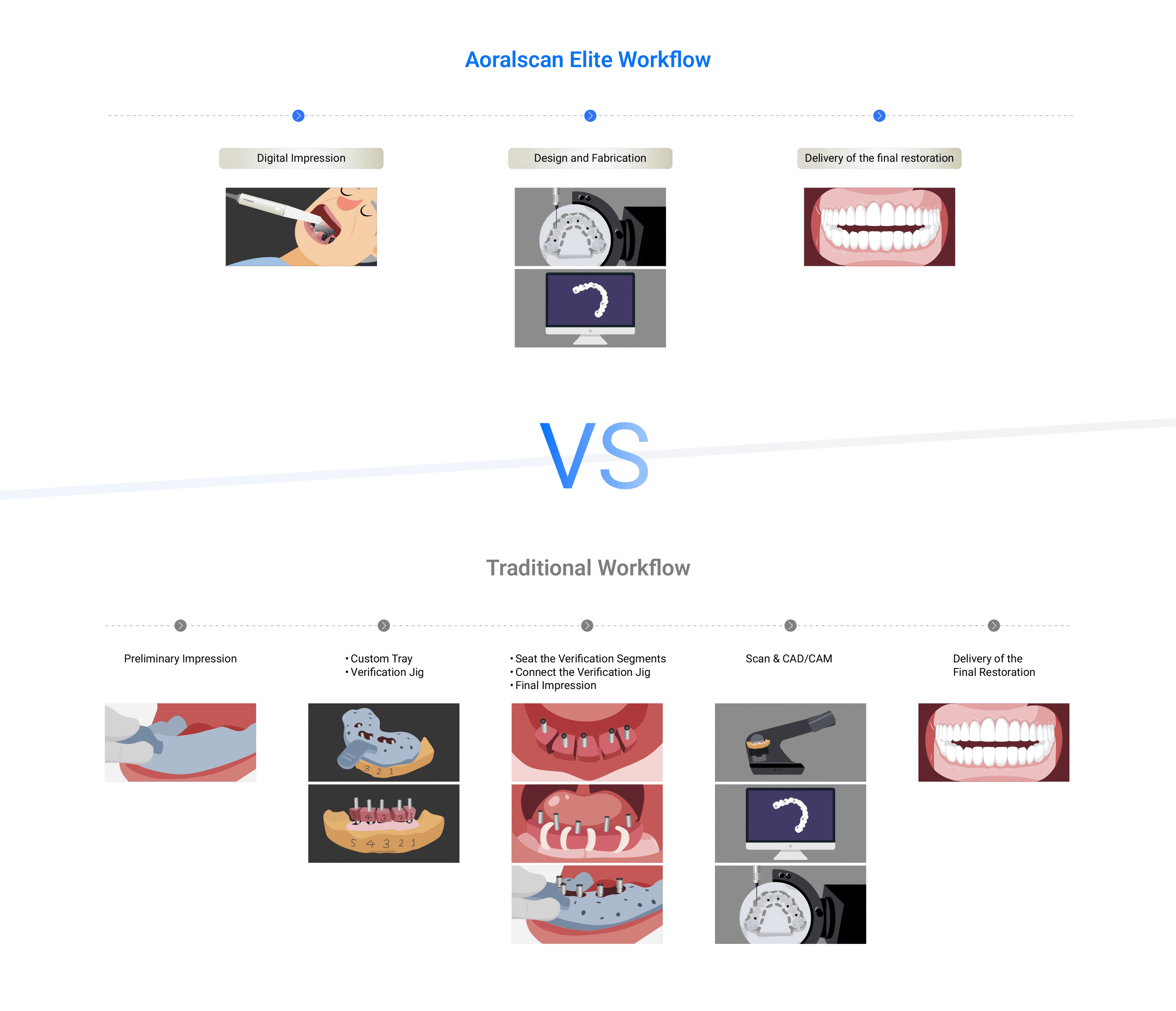
Problem: photogrammetry seems finicky for some cases. For single-tooth posterior implants in heavy saliva or with restricted access, an intraoral scanner can be faster and more predictable. For full-arch multiple implants where passive fit is critical, photogrammetry generally gives superior relational accuracy. Evaluate case complexity, clinician skill, and lab capability before choosing a route.
Real-world anchor: what the field shows
At IDS Cologne, clinicians and lab technicians demonstrated that consistent capture routines reduce remake rates noticeably; teams who standardized their capture sequences reported fewer alignment issues. Clinical groups at that event also highlighted the same practical point I see in clinic: clear protocols win. This practical consensus underlines why many teams now rely on Photogrammetry dental implant workflows for multi-implant cases.
Quick troubleshooting guide
If the software flags poor registration: 1) re-check scan-body seating; 2) compare clinical photos to the mesh; 3) re-scan the smallest missing area; 4) confirm consistent lighting. If the lab reports misfit: confirm export units (mm vs µm), and ensure the lab used the same library files for the scan bodies. Keep a short log of each issue so patterns reveal process changes you need.
Final synthesis
Start by solving the simplest failure points: consistent patient prep, repeatable camera paths, immediate verification, and disciplined file handoffs. Apply this checklist until it becomes routine; the predictable parts of the workflow free you to focus on the clinical decisions. For teams aligning clinical and lab practice around dependable photogrammetry systems, the practical value shows in fewer remakes and clearer communication — which is exactly the kind of reliability SHINING 3D DENTAL aims to support in everyday implant workflows.